

July 28th, 2026
Proactive vs Reactive Dental IT: What Monitoring Actually Catches
Industry Research — Dental Cybersecurity
Every dental practice I walk into has a story about the morning something was already broken.
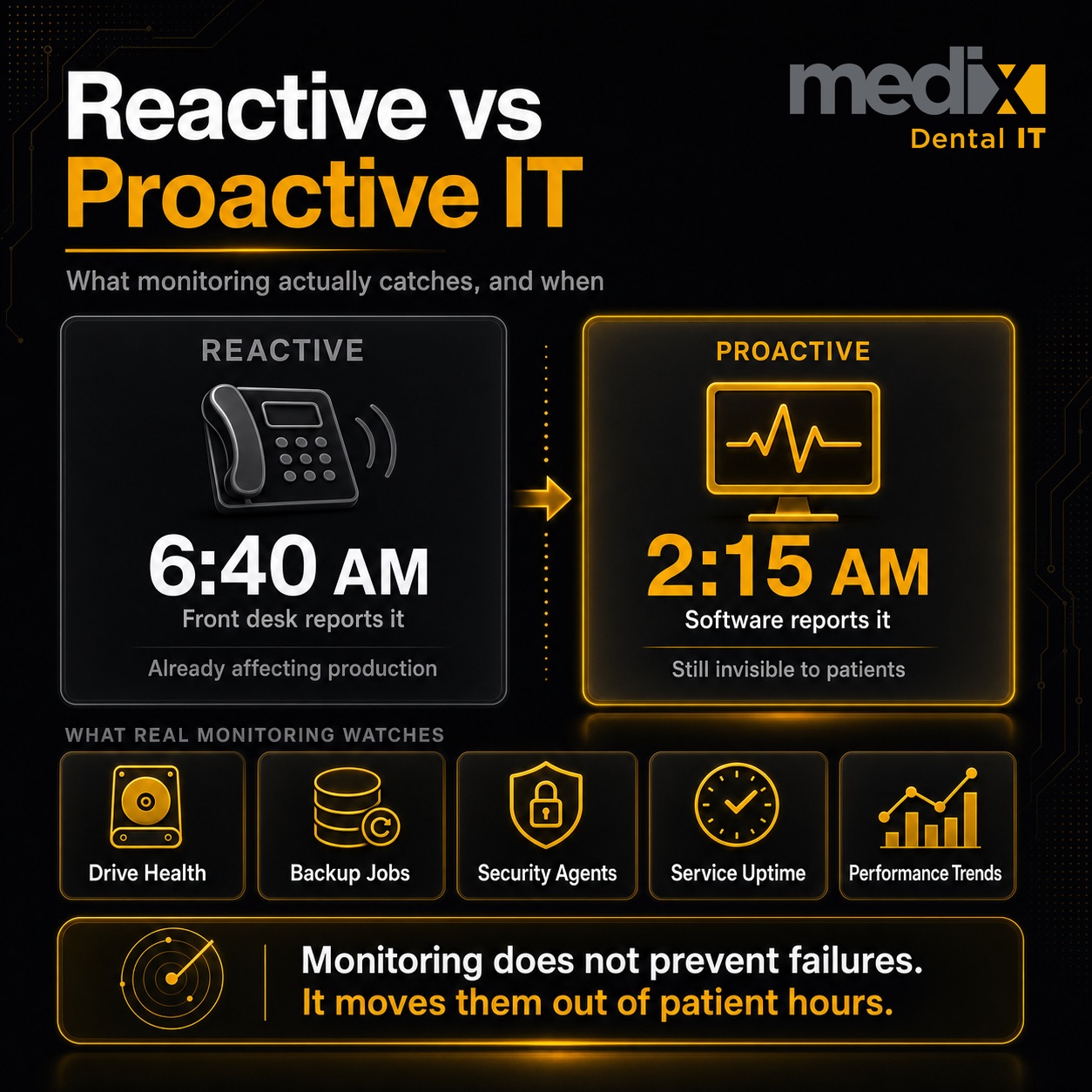
Proactive monitoring is the difference between finding out about a failure at 6:40 AM from your front desk and finding out about it at 2:15 AM from software that already opened a ticket. The technology is not new and it is not exotic. What has changed is that the gap between practices that run it and practices that do not has turned into an operational and financial gap you can measure. This is the honest version of what monitoring catches, what it does not, and how to tell whether yours is real.
Proactive vs Reactive IT: The Actual Difference
Reactive IT waits for a person to notice something and report it. Proactive IT watches the equipment directly and reports on its own.
That sounds like a small distinction. In a dental practice it is not, because the person who notices is almost always a clinical team member in the middle of patient care, and the noticing happens at the worst possible moment. Your hygienist is not a monitoring system. When she tells you the operatory computer is slow, the problem is already old.
Here is what separates the two models in practice.
| Dimension | Reactive IT | Proactive monitoring |
|---|---|---|
| How a problem is found | A team member notices and reports it | Software detects a threshold breach and alerts automatically |
| When it is found | During patient hours, once symptoms are visible | Continuously, including overnight and weekends |
| Typical first signal | “The computer is slow” or “it will not open” | Disk SMART warning, failed backup job, service stopped, drive at 90 percent |
| State of the problem at discovery | Already affecting production | Often still invisible to staff |
| Who absorbs the delay | The practice, in postponed appointments | The IT partner, off hours |
| What it costs to fix | Emergency response plus lost chair time | Scheduled remediation |
| Evidence trail | Anecdotal recollection | Logged, timestamped, reportable |
That last row is the one operators underrate. Reactive IT produces opinions about how things are going. Monitoring produces a record. If you run more than one location, the record is the only way you will ever compare them fairly.
What Monitoring Actually Watches
When someone sells you monitoring, ask what is being monitored. The word gets used to describe wildly different levels of coverage, and the cheap version is mostly a heartbeat check that tells you a machine is powered on.
Real coverage in a dental environment includes the following.
Drive health and storage capacity
Modern drives report their own degradation through SMART attributes before they fail outright. A monitored drive throwing reallocated sector warnings gets replaced on a Tuesday afternoon. An unmonitored one fails during a crown prep.
Capacity matters just as much in dentistry, because imaging fills disks in a way general business software does not. A server at 95 percent capacity does not announce itself politely. It starts refusing to write, and the first symptom is often your imaging software failing to save a study.
Backup job success, not just backup existence
This is the single most common gap I find. The practice has backups. Nobody has confirmed a backup actually completed since the day it was installed.
A backup that silently fails for four months is not a backup. It is a folder with old data in it. Monitoring should alert on a failed or skipped job the day it happens, and your provider should be verifying restores, not just green checkmarks. We go deeper on this in our guide to dental data backup and disaster recovery.
Security agent and patch status
Endpoint protection that is installed but not running is worse than none, because it shows up on a compliance checklist as present. Monitoring confirms the agent is actually active, actually updating, and actually reporting.
Patch status is the companion metric. Unpatched systems are how most practices actually get compromised, and the window between a patch release and active exploitation keeps shrinking. If you want to see how fast that goes wrong, we walked through a dental ransomware attack hour by hour.
Server and service availability
Your practice management database is a service that can stop without the server going down. Monitoring the box tells you the hardware is alive. Monitoring the service tells you Dentrix or Eaglesoft or Open Dental can actually accept a connection, which is the thing your team cares about.
Performance thresholds over time
Slow is a trend before it is a complaint. Memory pressure, sustained high disk queue length, and CPU saturation all show up in monitoring data weeks before anyone files a ticket. Slow machines are rarely a mystery once you have the trend data, and they are almost never solved by rebooting. We worked through the underlying causes in our guide to why dental office computers are slow.
What Monitoring Does Not Do
I would rather set the expectation correctly than oversell this.
Monitoring does not prevent failures. It detects them earlier. A drive that is going to die will still die. The value is entirely in compressing the time between onset and response, and in moving the response out of your patient hours.
Monitoring also does not fix anything by itself. An alert that nobody triages is noise, and a dashboard nobody reads is decoration. The alert has to route to a human with the authority and the tooling to act on it, at the hour it fires. When practices tell me monitoring did not help them, this is almost always the reason. They bought the sensor and not the response.
And monitoring will not catch a problem that generates no telemetry. A staff member emailing patient information to the wrong address produces no alert on any dashboard. That is a training and access control problem, not a monitoring problem.
The Multi-Location Version of This Problem
At a single office, the absence of monitoring is a risk you can partly absorb through familiarity. The office manager knows which computer is the flaky one. That knowledge is real, and it is why plenty of single practices get by without much instrumentation.
It does not survive contact with a second location, and it definitely does not survive an acquisition.
When you operate multiple offices, you inherit whatever each one was doing before you arrived. One location has a four year old server with a failing drive nobody has looked at. Another has backups that stopped succeeding under the previous owner. A third is fine. You have no way to know which is which without instrumentation, because the only reporting you have is how loudly each office complains, and the loudest office is rarely the one in the most danger. This is one of the recurring problems in supporting IT across multi-location dental groups.
This is the part that shows up in diligence. When a buyer asks about your technology posture across fifteen locations, “we have not had many problems” is not an answer. Monitoring data is. Documented, consistent infrastructure reporting is one of the quieter contributors to what a group is worth, and full integration can increase your DSO valuation by 2 to 4x EBITDA. Buyers pay for groups that will not surprise them.
Standardization is what makes the data usable. If every office is monitored differently, you have fifteen dashboards and no comparison. We cover the broader pattern in our approach to IT standardization across DSO locations.
How To Tell If Your Monitoring Is Real
Most practices I assess believe they have monitoring. A meaningful share of them have an agent installed and nothing behind it. Four questions will tell you which you have.
When did your provider last contact you about something before you noticed it? If the answer is never, you are paying for reactive support with a monitoring line item on the invoice. A working setup generates proactive contact. Not constantly, but it happens.
What happens to an alert at 2 AM on a Saturday? Ask specifically whether alerts route to a staffed queue outside business hours or into an inbox someone opens Monday. Both are legitimate service models at different price points. Only one of them is what most people picture when they hear monitoring.
Can you see a report without asking for one? Backup success rates, patch compliance, device health by location. If producing that requires your provider to go build something, it was not being tracked in a way you can act on.
What is monitored, specifically? Get the list. Workstations, servers, network hardware, backup jobs, security agents. Coverage gaps usually live in the equipment nobody thinks of as a computer, which in dentistry means imaging systems and the machines attached to them.
If those answers come back thin, that is worth a conversation with your provider before it is worth switching. If it does come to switching, here is how the major dental IT companies compare. Our list of reasonable expectations for a dental IT partner is a fair benchmark to hold them to.
So Is It Worth It?
For a single practice, monitoring is worth it if you have a server, if you rely on digital imaging, or if a lost day of production would genuinely hurt. That covers nearly every practice operating today.
For a multi-location group, I do not think it is optional in any real sense. Not because of the failures it prevents, though it prevents some, but because without it you are running an organization you cannot see. You will make capital planning decisions, provider decisions, and acquisition decisions on anecdote.
The honest framing is not that monitoring pays for itself through disasters averted. Those are hard to count and easy to overstate, and anyone selling you a dramatic number is guessing. The framing is that it converts your infrastructure from something you find out about into something you can manage. That is worth the monthly cost well before you factor in the outage it catches.
Frequently Asked Questions
What is the difference between proactive and reactive IT support?
Reactive support responds after a person reports a problem, which means the issue is already affecting patient care by the time work begins. Proactive monitoring watches systems continuously and generates an alert when a measurable threshold is crossed, often before staff notice anything. The practical difference is timing and cost: reactive work happens during production hours under pressure, while proactive work is usually scheduled.
What should dental IT monitoring actually cover?
At minimum: drive health and storage capacity, backup job success or failure, security agent status, patch compliance, server and practice management service availability, and performance trends on workstations. In a dental environment, imaging systems and the machines attached to them need explicit coverage, because they are frequently missed and they consume storage faster than anything else in the office.
Does proactive monitoring prevent downtime?
Not entirely. Monitoring detects problems earlier rather than preventing them from occurring. A failing drive still fails. The value is in shortening the time between onset and response and in shifting that response outside patient hours, which is what turns a lost day of production into a scheduled replacement.
How do I know if my IT provider’s monitoring is working?
Ask when they last contacted you about an issue before you noticed it, where alerts route outside business hours, whether you can pull a device health or backup report on demand, and exactly what is on the monitored list. If your provider has never reached out proactively and cannot produce a report without building one, the monitoring is likely nominal.
Is proactive monitoring worth it for a single dental practice?
Generally yes, if the practice runs a server, depends on digital imaging, or would be materially hurt by losing a day of production. Single offices can partly compensate through staff familiarity with their own equipment, but that knowledge does not extend to backup verification or security agent status, which are the two gaps that cause the most damage.
Why does monitoring matter more for a DSO or multi-location group?
Because familiarity does not scale. Across multiple offices, especially acquired ones, you inherit unknown infrastructure conditions and have no way to compare locations without consistent instrumentation. Monitoring data is also what supports capital planning and what a buyer expects to see in technology diligence.
Posted in Dental Cybersecurity


























































