

October 12th, 2026
Ransomware Incident Response for Dental Practices: Why Your IT Provider Shouldn’t Run It Alone
Industry Research — Dental Cybersecurity
A practical ransomware incident response guide for protecting your patients, preserving critical evidence, and recovering your practice after a cyberattack.
Imagine arriving at your dental practice on Monday morning to discover that your practice management software won’t open, patient records are inaccessible, and a message on your server demands payment to restore your data.
Your first instinct might be to call your IT provider and demand that everything be restored immediately. After all, you have patients arriving, a schedule to maintain, and a business that cannot afford extended downtime.
That instinct is understandable, but acting on it without the right guidance could make a bad situation significantly worse.
Ransomware incidents are not simply IT emergencies. They are cybersecurity investigations, potential HIPAA breaches, insurance events, and business continuity crises happening simultaneously.
The decisions you make in the first few hours can determine how quickly your practice recovers, whether your cyber insurance responds to the claim, and whether you meet your legal obligations.
This guide explains the ransomware incident response steps every dental practice should follow and why having a ransomware-specific section within your Incident Response Plan is essential.
1. Recognize the Incident and Immediately Contain the Threat
Your first priority is to stop the attack from spreading, not to begin restoring systems.
Ransomware is malicious software that can encrypt files and prevent access to your systems. Some attackers also steal sensitive information and threaten to release it publicly unless a ransom is paid.
Common warning signs include:
- A ransom message appearing on a computer or server.
- Patient records, X-rays, or practice management systems suddenly becoming inaccessible.
- Files being renamed or displaying unusual extensions.
- Multiple computers experiencing unexpected failures simultaneously.
- Alerts from your cybersecurity provider about suspicious or malicious activity.
If you suspect ransomware:
Stop using affected systems immediately. Notify your practice owner or designated Incident Response Plan leader and contact your IT or cybersecurity provider to initiate emergency containment.
Affected devices should be isolated from the network to prevent the attack from spreading. This may involve disconnecting network cables, disabling wireless connectivity, or isolating systems through security tools.
Whenever possible, avoid shutting down affected computers. Important forensic evidence may exist in system memory and could be lost when equipment is powered off. If network isolation is impossible and the threat is actively spreading, powering down equipment may be necessary.
Do not delete suspicious files, reinstall software, reset systems, or attempt recovery on your own.
Your IT provider has an immediate role in containing the threat, but containment and restoration are two very different things.
The goal at this stage is to prevent additional damage while preserving the evidence needed to understand what happened.
2. Contact Your HIPAA Expert and Cyber Insurance Carrier Immediately
This is one of the most important steps in the entire response process.
Many practices instinctively place their IT provider in charge of a ransomware incident. While an IT provider may be excellent at managing technology, they are not necessarily qualified to manage the legal, regulatory, forensic, and insurance complexities of a cyberattack.
A ransomware event requires multiple specialists working together.
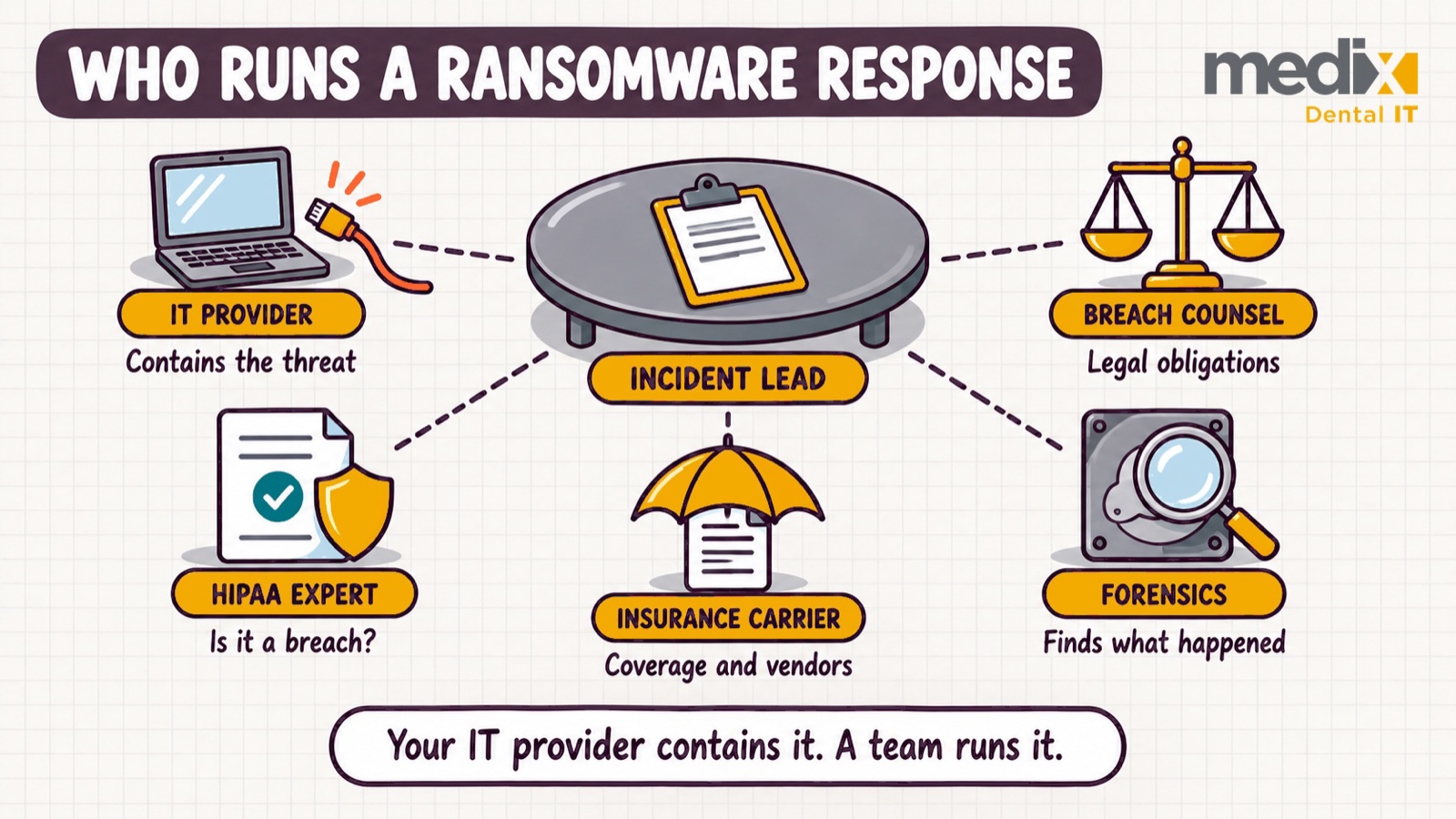
We recommend involving your HIPAA expert and cyber insurance carrier immediately, alongside your IT provider’s initial containment efforts.
Your HIPAA expert
A qualified HIPAA expert helps your practice understand its privacy and regulatory obligations, including whether protected health information may have been compromised.
They can coordinate with legal counsel and forensic investigators to help evaluate:
- What patient information may have been accessed, stolen, altered, or made unavailable.
- Whether the incident constitutes a reportable breach under HIPAA.
- Which federal and state reporting requirements apply.
- What documentation must be maintained.
- Whether patients, regulators, or other parties must be notified.
Our recommended HIPAA expert: Amy Wood, Copper Penny Consulting
Amy Wood has extensive experience helping dental practices navigate HIPAA compliance and data breaches. Her dental industry focus and experience with breach investigations make her a valuable resource during these high-pressure situations.
For transparency, Amy Wood and Medix CEO Tom Terronez are both founding faculty members of the Dental Ownership Collective.
Learn more at Copper Penny Consulting.
Your cyber insurance carrier
Your cyber insurance policy is more than financial protection. Depending on your coverage, it may provide access to specialized incident response resources, including:
- Cybersecurity incident response attorneys, often referred to as breach counsel.
- Digital forensic investigators.
- Ransomware negotiation specialists.
- Data recovery and restoration resources.
- Patient notification and public relations services.
- Business interruption and recovery expense support.
Contact your carrier using the incident reporting number in your policy, rather than waiting to contact your regular insurance agent during business hours.
Insurance carriers may require the use of approved professionals or prior authorization for certain services. Unauthorized recovery work or other actions taken before consulting the insurer can jeopardize coverage for related expenses or, depending on the policy and circumstances, affect the claim itself.
The right approach is to have the insurance carrier, qualified legal and HIPAA advisors, forensic investigators, and IT provider coordinate the response before making major recovery decisions.
Your IT provider should remain an essential member of the response team, but should not independently control the entire investigation.
3. Preserve Evidence Before Attempting Restoration
One of the biggest mistakes a dental practice can make is allowing someone to immediately begin rebuilding the affected server or restoring backups over existing systems.
Although well-intentioned, this can permanently destroy information needed to investigate the attack.
Digital forensic specialists may need to examine affected systems to determine:
- How the attacker initially gained access.
- How long the attacker had access before the ransomware was deployed.
- Which computers, servers, and accounts were compromised.
- Whether patient information was accessed or removed.
- Whether the attacker still has a method of accessing your environment.
This information is critical to understanding the true scope of the incident.
For example, successfully restoring a server does not establish whether an attacker downloaded thousands of patient records before encrypting the system.
In many ransomware attacks, encryption is simply the final, most visible stage of a much larger intrusion.
Why this matters for cyber insurance: Insurers may require forensic evidence to validate the incident, evaluate covered losses, and determine which response expenses are eligible for reimbursement. Destroying that evidence can complicate the claim and potentially compromise coverage.
Your forensic response team should direct evidence preservation, including maintaining copies of affected drives, relevant system logs, and other investigative information.
Do not attempt to clean up the scene before the investigators have done their work.
4. Keep Your Practice Operating Safely
While the technical investigation is underway, your practice still has patients to care for.
Your Incident Response Plan should include a business continuity or downtime procedure that allows the team to continue appropriate operations without relying on compromised systems.
Depending on the extent of the attack, this could include:
- Moving to approved paper documentation and scheduling procedures.
- Using independently verified patient contact information and available appointment records.
- Accessing clinical information through systems confirmed to be safe.
- Temporarily modifying your schedule to prioritize urgent and essential care.
- Coordinating referrals or rescheduling patients when critical clinical information is unavailable.
Patient safety must always take precedence over maintaining a full schedule.
If your clinical team cannot reliably access medical histories, allergies, medications, or other essential records, determine whether it is appropriate to proceed with treatment.
Staff should also avoid using personal email accounts, unsecured file-sharing services, or unauthorized devices to work around unavailable practice systems.
These shortcuts can introduce additional privacy and security risks.
Appoint one person to coordinate internal communications and operational decisions. Staff should receive clear instructions about which systems are safe to use and what information can be shared with patients.
Do not speculate publicly about whether patient data has been stolen. Communications about the incident should be coordinated with the designated response team.
5. Restore Operations in a Separate, Clean Environment
Once the threat has been contained and forensic preservation is addressed, attention can turn to restoring the systems necessary to operate the practice.
Our recommendation is to restore critical systems into an isolated cloud recovery environment, using separate infrastructure from the equipment impacted by the attack.
This is an important distinction from simply restoring backups onto the compromised server.
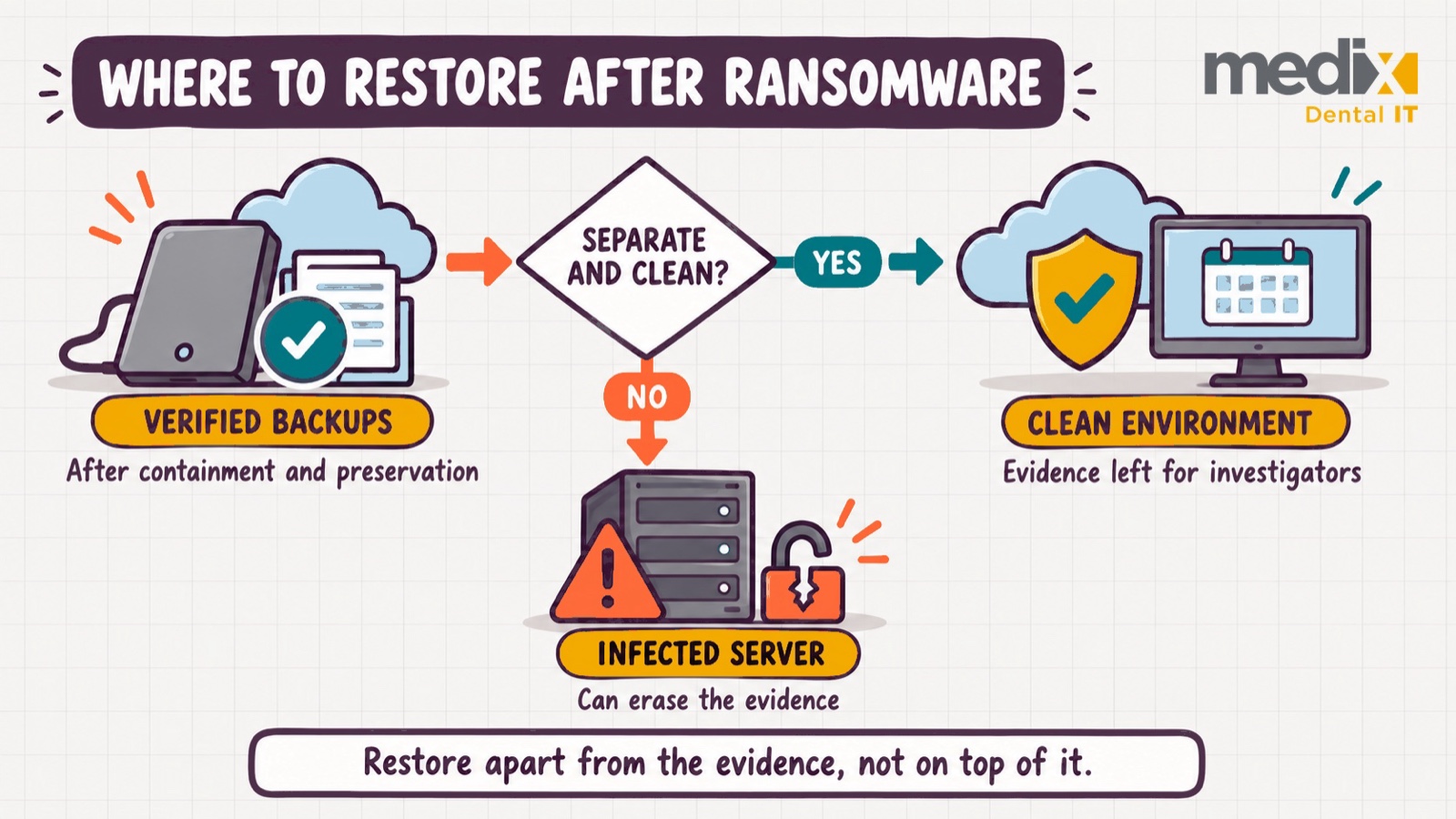
A properly designed recovery environment allows a practice to work toward operational recovery while leaving affected equipment and evidence available for forensic investigation.
A cloud-based recovery approach may offer several advantages:
Preserves the original environment. Investigators can continue examining compromised systems without recovery work overwriting potentially critical evidence.
Reduces the risk of reinfection. A separate, properly secured environment helps prevent compromised systems from immediately exposing restored applications and data to the same threat.
Supports faster business continuity. Depending on backup quality, available infrastructure, and application compatibility, a cloud environment may allow essential practice systems to become available before local infrastructure is fully rebuilt.
Creates flexibility for recovery. The practice can evaluate whether to return to newly rebuilt local equipment or transition to a longer-term cloud infrastructure strategy.
For transparency, Medix designs and manages cloud recovery environments for dental practices. The advantages above apply regardless of which provider builds the environment.
For dental practices, special attention must be paid to practice management software, imaging systems, databases, integrations, and network-dependent equipment. Not every dental application can be moved to the cloud without additional planning.
Before restored systems are used, qualified recovery personnel should verify that backups are trustworthy, recovery infrastructure is secure, credentials have been addressed, and the original method of compromise has been contained.
The recovery environment must remain isolated from affected systems, with access permitted only after appropriate security validation.
Do not reconnect compromised equipment or restore directly onto affected systems until the forensic and recovery teams have explicitly approved that action.
A separate cloud environment is our preferred recovery strategy, but an equally isolated clean environment using replacement equipment may be necessary when application, connectivity, or other requirements prevent cloud recovery.
6. Determine Whether Patient Information Was Compromised
Restoring operations and investigating a potential data breach are separate responsibilities.
One can be completed before the other.
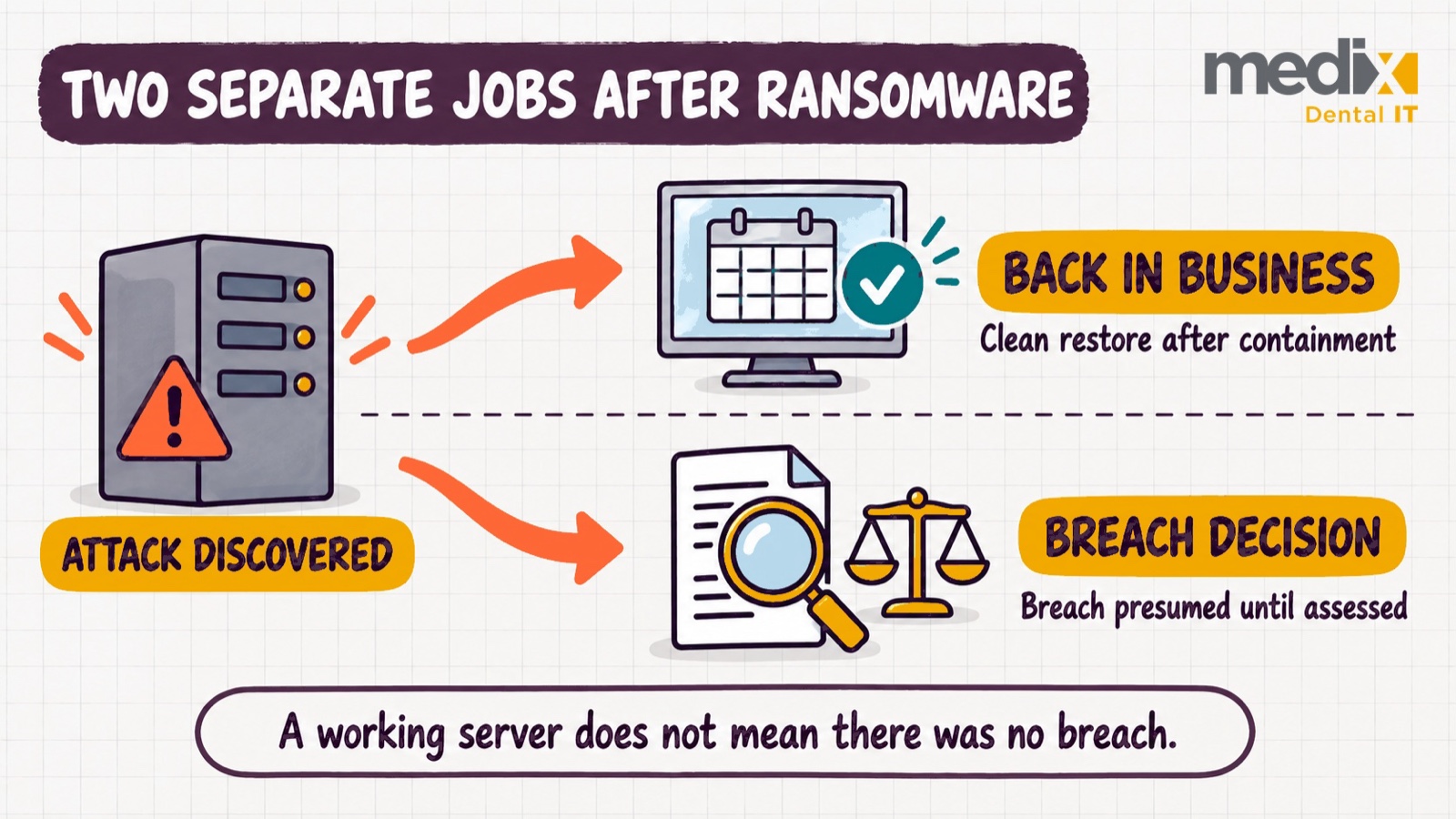
Under HIPAA, a ransomware incident involving electronic protected health information may constitute a breach, even when there is no obvious evidence that an attacker downloaded patient files.
The U.S. Department of Health and Human Services explains that when ransomware accesses protected health information, a breach is presumed unless the covered entity can demonstrate a low probability that the information was compromised through a properly documented assessment, or another applicable exception applies.
The assessment considers the nature of the information, who may have accessed it, whether it was actually acquired or viewed, and the extent to which the risk was mitigated.
Importantly, restoring patient records from backups does not automatically eliminate the possibility of a reportable data breach.
This is why engaging your HIPAA expert and appropriate legal counsel at the beginning of the incident is so critical.
Federal and state laws both matter
Under the HIPAA Breach Notification Rule, when a reportable breach of unsecured protected health information is identified:
- Affected individuals generally must be notified without unreasonable delay and no later than 60 calendar days after discovery of the breach.
- Breaches involving 500 or more individuals must be reported to HHS without unreasonable delay and no later than 60 calendar days after discovery.
- Breaches involving fewer than 500 individuals generally may be reported to HHS within 60 days after the end of the calendar year in which they were discovered.
- Breaches involving more than 500 residents of a single state or jurisdiction also require notice to prominent media outlets serving that area.
These are federal requirements, and they are not the only obligations a practice may face.
Individual states have their own data breach notification laws.
Depending on the state and circumstances, those laws may have different definitions of protected information, notification deadlines, reporting thresholds, and requirements to notify state authorities.
Practices with patients residing in multiple states may have additional considerations. Certain state laws provide special treatment for HIPAA-regulated entities, but that does not mean HIPAA compliance automatically satisfies every state requirement.
Other contractual or regulatory reporting obligations may also apply.
A qualified HIPAA expert and legal counsel should evaluate all applicable obligations and timelines. Do not assume that the federal 60-day outer limit is the deadline for every required notification or that waiting until the investigation is entirely finished is permissible.
7. Do Not Negotiate or Pay a Ransom Independently
A ransom demand can create enormous pressure, especially when a practice is unable to access clinical or financial information.
However, paying a ransom does not guarantee your data will be recovered, that stolen information will be deleted, or that the attackers will not return.
Ransom payments can also introduce significant legal and financial considerations, including potential sanctions violations.
Do not attempt to communicate with attackers, negotiate payment, or transfer funds without guidance from your cyber insurance carrier, incident response counsel, and appropriate authorities.
A qualified response team can assess potential recovery options, the credibility of the attackers’ claims, legal restrictions, and whether any decisions involving payment are appropriate.
We also recommend reporting the incident as soon as possible, in coordination with your response advisors. CISA’s ransomware guidance points victims to their local FBI field office, the FBI’s Internet Crime Complaint Center (IC3), or CISA.
8. Document Everything and Strengthen Your Defenses
Once the practice has resumed operations, the incident is not necessarily over.
The practice and its response team must ensure that all necessary follow-up actions are completed, including regulatory reporting, financial documentation, security remediation, and patient communications where required.
Maintain a detailed incident record that includes:
- When and how the incident was discovered.
- Who was notified and when.
- Which systems and locations were affected.
- Actions taken to contain the attack.
- Forensic findings and documented breach assessments.
- Restoration activities and recovery milestones.
- Insurance communications and related expenses.
- Required notifications and reporting confirmations.
This documentation may be essential for insurance claims, compliance reviews, and future legal questions.
After the incident, conduct a formal review with your response team. Determine what allowed the attack to occur and what changes are needed to reduce the chance of it happening again.
These improvements may involve stronger identity protection, better network segmentation, enhanced cybersecurity monitoring, additional staff training, or more resilient backup and recovery capabilities.
Your Incident Response Plan should then be updated based on what was learned.
A ransomware incident should not become the first time your practice discovers whether its recovery procedures actually work.
Your Incident Response Plan: A Ransomware-Specific Checklist
Every dental practice should maintain a written Incident Response Plan, with a ransomware-specific procedure that can be activated immediately. The plan should clearly identify decision-makers and be accessible even when computers and internet services are unavailable.
The following checklist should be incorporated into that plan:
- Identify and contain: Stop using affected systems, notify leadership, and have IT or security personnel isolate the threat.
- Activate the response team: Contact your HIPAA expert, cyber insurance carrier, and appropriate incident response or legal professionals immediately.
- Preserve evidence: Instruct IT not to wipe, rebuild, or restore affected systems without forensic authorization.
- Protect patient care: Activate approved downtime procedures and evaluate which clinical services can safely continue.
- Investigate: Have qualified forensic professionals determine the attack’s scope, cause, and potential data exposure.
- Recover safely: Restore verified backups to an isolated, clean cloud environment or other appropriately separated recovery infrastructure.
- Evaluate reporting obligations: Work with HIPAA and legal advisors to determine applicable federal, state, and contractual requirements.
- Document and improve: Preserve incident records, complete required notifications, address security weaknesses, and update the response plan.
The Most Important Lesson: Have the Right People Making the Right Decisions
A ransomware attack is one of the most disruptive events a dental practice can experience. But the damage is not determined solely by the sophistication of the attack. The decisions made after discovering it can have an equally significant impact.
Your IT provider plays a crucial role in containing the threat, supporting the investigation, and restoring operations. However, that does not mean they should independently direct every aspect of the response.
HIPAA experts, legal counsel, cyber insurance professionals, forensic investigators, and IT teams each have specialized responsibilities.
Bringing these professionals together early can help preserve critical evidence, avoid preventable insurance complications, protect patient information, and support a safer, more effective recovery.
The goal is not simply to get your computers running again. It is to restore your practice while protecting your patients, your business, and your future.
At Medix Dental IT, we believe cybersecurity preparedness goes far beyond installing security tools. It requires thoughtful planning, experienced partners, and the ability to make the right decisions when they matter most.
A ransomware-specific Incident Response Plan, an established relationship with a qualified HIPAA expert, an appropriate cyber insurance policy, and a proven recovery strategy are essential parts of that preparation.
Because when ransomware strikes, the most important thing your practice needs is not someone rushing to restart the server.
It’s a team that knows exactly what to do next.
Ransomware Incident Response FAQs
Should a dental office shut off its computers during a ransomware attack?
Powering down should not be the first move. Disconnect affected machines from the network instead, by unplugging network cables, turning off Wi-Fi, or isolating them through your security tools, because powering a machine down can erase evidence held in memory. CISA’s guidance draws the same line: power down only as a last resort, when you cannot disconnect a device from the network. Either way, do not wipe, reinstall, or restore anything on the affected machines until the forensic team clears it.
Can our IT provider just restore from backup and get us running again?
Restoring is part of recovery, but restoring onto the infected server, or before evidence is preserved, can overwrite what investigators need and expose restored applications and data to the same threat. Restore verified backups into a separate, clean environment instead. And a working server does not answer the HIPAA question of whether a breach occurred.
Should a dental practice report a ransomware attack to the FBI?
Yes, we recommend it. CISA and the FBI ask victims to report through a local FBI field office, the FBI’s Internet Crime Complaint Center (IC3), or CISA. Coordinate the report with your breach counsel and insurer. Reporting to law enforcement does not satisfy your HIPAA notification obligations. If an official states that notifying patients would impede a criminal investigation, document it: a written statement sets the delay period, while an oral one allows no more than 30 days unless it is followed up in writing.
Does our cyber insurance carrier have to approve the forensic firm and other vendors?
It depends on the policy. Some carriers require you to use their panel vendors or to get consent before you incur response costs, and work done before the carrier is notified may not be reimbursed. Others leave the choice to the policyholder. Do not count on reading the policy for the first time in the middle of an incident. Find the incident reporting number and the vendor and consent terms now, and put both in your Incident Response Plan.
What should the ransomware section of a dental Incident Response Plan include?
Beyond the checklist above, make three things explicit: who leads the response and can approve downtime and spending, the direct numbers for your IT provider, HIPAA expert, breach counsel, and your carrier’s incident line, and a log for recording every decision and who made it. For a multi-location group, also name who can isolate shared systems, such as a central practice management server, the domain, and the connections between offices, so one compromised location does not take the others down. Keep a printed copy, because the plan has to work when the computers do not.
Posted in Dental Cybersecurity


























































