November 25th, 2026
SmileData Review: Dental Analytics Built for Open Dental Groups
Industry Research — DSO
Most dental groups I work with already pay for some kind of reporting. The harder question is whether anyone trusts the numbers enough to act on them.
SmileData (smiledata.com) is a reporting and analytics platform for dental practices and groups from SmileData LLC in Atlanta, co-founded by Ash Toub, Dr. Farid Toub and Dr. Frank Nia. Its deepest integration is with Open Dental. It refreshes your practice data every night, comes with four ready-made dashboards, and lets your team ask for new charts in plain English. List price is $399 per office per month, with no contract.
One thing to know before my take: Medix uses SmileData, and several of the dental groups we support run it. Medix receives no payment from SmileData. The product facts below come from SmileData’s own site and agreements, and the opinions are mine.
My short answer: for an Open Dental group without its own data team, SmileData is the reporting tool I would look at first. Before you sign, there are five parts of its agreements worth reading and a few answers to get in writing. I cover both below.
What SmileData Does
SmileData connects to your practice software and the systems around it, then turns that data into dashboards your team can read without building anything.
Connections. Open Dental connects with an API key, and SmileData says dashboards are live the day you connect. Dentrix and Eaglesoft are “available today, set up with our team.” It also pulls in QuickBooks, Excel budget and goal sheets, phone systems like Weave and RingCentral, marketing accounts and payroll.
Four built-in dashboards. Daily Dashboard, Scheduling Opportunities, Claims Dashboard and Executive Dashboard come ready once your data is connected. Tap the “i” next to any number and it shows exactly how that number is calculated.
Plain-English requests. Type something like “ortho starts by office and close rate by provider,” and SmileData builds the chart and saves it as a card. Cards become pages, and pages become dashboards for each role or office.
Audio briefings. Pick any dashboard, say what you want covered, and set a schedule, such as every Monday at 6 AM. SmileData writes and records an episode that lands on your phone, with a transcript. The sample on its site runs about five minutes.
Your own targets. Upload budgets, goals, fee schedules or policies, and the AI uses them as benchmarks, like a goal line on a chart.
Where SmileData Stands Out for Dental Groups
It is built to match your practice software. This is the part I care about most. SmileData publishes an Open Dental Production and Income report for one office next to its own summary card, figure for figure, and says it checks its numbers against your practice software’s reports and fixes anything that does not match.
That matters because when leadership and the office manager pull different numbers for the same month, the meeting turns into an argument about the numbers instead of a decision. SmileData also lets you save a number as a KPI once, so everyone in the organization gets the same definition.
That is the reporting side of IT standardization across locations. If every office defines collections its own way, the comparison across offices means very little.
It was built by operators. SmileData’s three co-founders run a multi-location dental group together, two of them are practicing dentists, and they run their own offices on it. Features like the claims follow-up list and the morning huddle view reflect that.
It reaches leaders who rarely log in. Most groups have an owner or regional director who will not open a dashboard on a busy week. A short audio recap on Monday morning is a practical answer to that.
SmileData Pricing
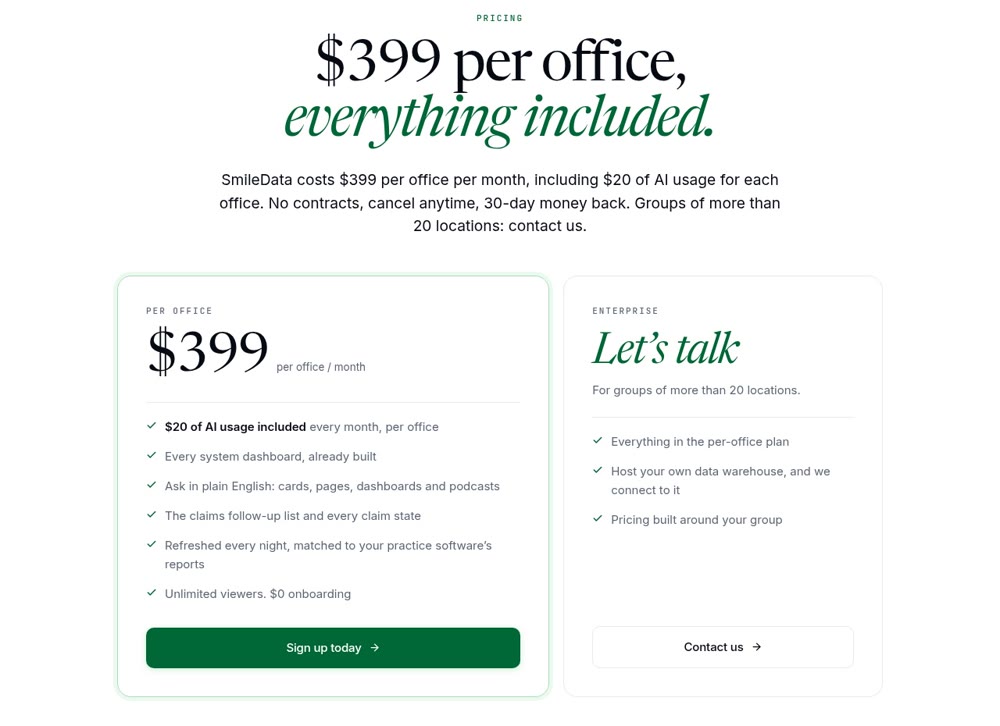
SmileData’s pricing page lists one plan at $399 per office per month. That includes $20 of AI usage per office, every built-in dashboard, unlimited viewers and $0 onboarding. Billing is monthly, there is no contract, and there is a 30-day money-back guarantee.
At list price, a 10-office group would pay $3,990 a month, or $47,880 a year. Its page for groups says DSO pricing is set with you based on location count and data setup, so treat that figure as the published starting point, not a quote. Groups with more than 20 locations get custom Enterprise pricing and the option to keep their own data warehouse, with SmileData connecting to it.
You can buy direct or through its partners Flex Dental, DEO and SKF Practice Solutions. The pricing page does not say what heavier AI use costs once an office passes its $20. The built-in dashboards do not draw on that allowance, but plain-English requests and audio briefings do, so ask before you roll it out to a team that will use it heavily.
For context, SmileData’s build-versus-buy model estimates a 10-office group would spend about $783,057 over three years building its own warehouse and KPI layer. That is the vendor’s own illustration, built from published prices and pay data, and most of the cost is engineering headcount.
How SmileData Handles Patient Data
SmileData keeps its own copy of the practice data it reads, so this is the section I would read first on any reporting vendor. Its security page is easy to audit, because it ties each commitment to a numbered section of its agreements.
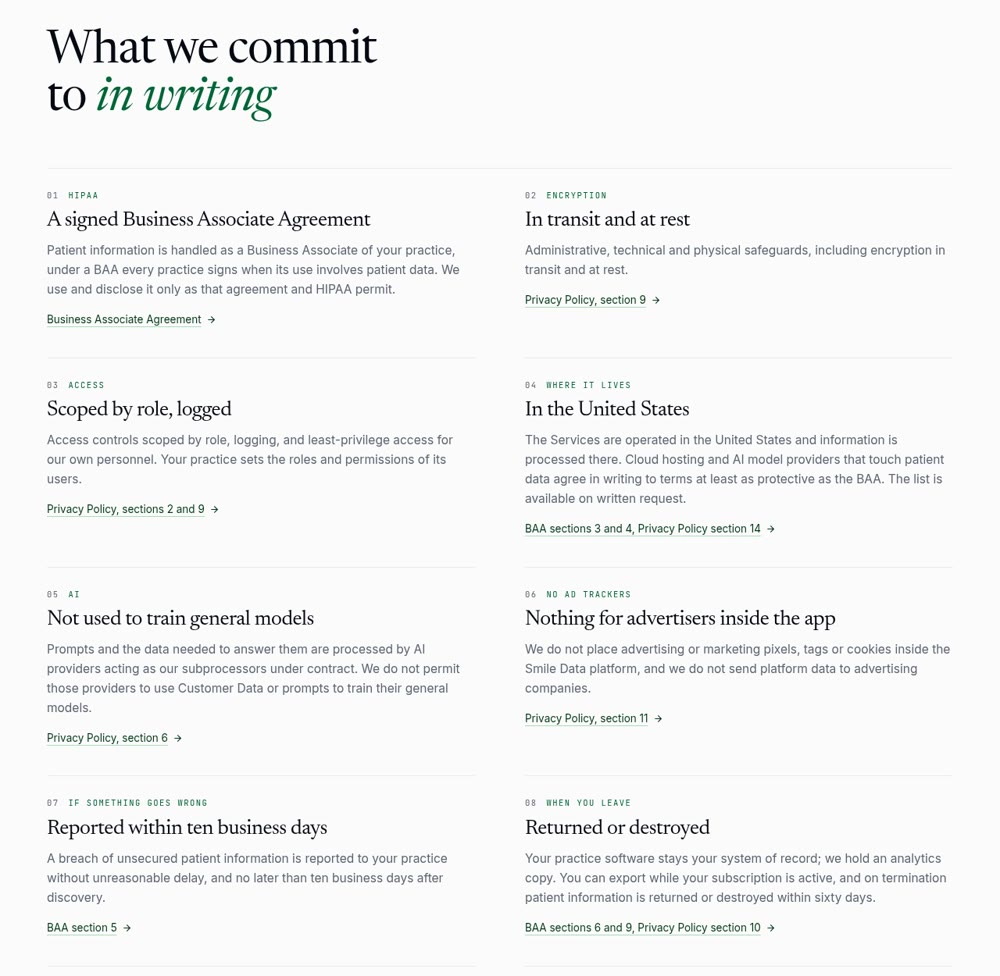
What it commits to. Every practice signs a Business Associate Agreement when its use involves patient data. Data is encrypted in transit and at rest, access is scoped by role and logged, and processing happens in the United States. Its AI providers may not use your data or prompts to train their general models, and the app itself carries no advertising trackers.
The breach clause is tighter than the law requires. HIPAA’s rule for business associates requires notice without unreasonable delay and sets 60 calendar days as the outer limit, apart from a narrow law-enforcement delay. SmileData’s BAA keeps the same promptness standard and shortens the outer limit to ten business days after discovery.
What You Sign When You Buy SmileData
Five parts of SmileData’s agreements are worth reading before you connect your first office, plus one smaller clause. Some favor you and some favor SmileData.
It keeps a copy. SmileData says it holds “an analytics copy” of your practice data, and your practice software stays the system of record. That copy is why I tell groups to ask every software vendor one question: how many copies of our patient data do you keep, and where? We wrote about where dental vendors copy patient data if you want the full checklist.
Subprocessors are listed on request. Cloud hosting and AI providers that touch patient data agree in writing to terms at least as protective as the BAA. The list itself is “available on written request.” Request it, and keep it with your vendor file.
De-identified data. Section 6.2 of the terms lets SmileData create de-identified and aggregated data across customers, and use and disclose it for research, benchmarking, product improvement and AI development. Know that before you sign. Our guide to dental AI and HIPAA covers what de-identification does and does not protect.
Who pays for breach notification. Section 5.3 of the BAA makes your practice “solely responsible” for deciding whether and how to notify patients, HHS, the media and state regulators, and for the cost of those notifications, unless a court or regulator “finally determines” the breach was caused by SmileData’s violation of the BAA. Have your attorney and your cyber insurer read that clause.
One smaller clause. Section 6.3 of the terms says you own the charts and answers SmileData generates from your data, and SmileData may keep and use them internally to run and improve the product.
Leaving. You can export any table while you are subscribed. If you ask in writing within 30 days of termination, SmileData provides a copy of your data. Patient data it is feasible to return or destroy is handled within 60 days, and anything it cannot, such as data in routine backups, stays under BAA protection.
One gap: the security page does not name a SOC 2 report or other third-party audit. If your procurement process or cyber insurer requires one, ask SmileData for its current status in writing.
Where I’d Hesitate on SmileData
The data refreshes nightly. Your morning huddle starts from yesterday’s close. A testimonial on the site describes the dashboards as real-time, but SmileData’s own product pages consistently say nightly, so plan around overnight data.
AI answers still need checking. SmileData’s privacy policy says plainly that “AI outputs can be wrong.” The built-in dashboards are the numbers it reconciles against your practice software. A chart someone builds by asking a question is new math, so check it against a report you trust before it drives a decision.
Open Dental comes first. SmileData calls itself an authorized Open Dental partner, and Open Dental is the only system it describes as live the day you connect. Dentrix and Eaglesoft are supported. For other practice software, the site says “ask us and we will connect it,” so treat anything else as a request until it is live.
Our post on Open Dental integrations explains why so many tools build for Open Dental first.
SmileData connects through the Open Dental API, and our Open Dental Cloud vs self-hosted comparison notes that Cloud handles outside reporting tools through the API. Open Dental also lists third-party limits for Cloud, so if you run Cloud rather than your own server, confirm the connection with both vendors.
New features: get them in writing. SmileData’s launch post for Smile Bot, its new report-building assistant, lists Planet DDS support and 24-hour setup. Neither appears on its integrations page yet. If a new integration matters to your decision, confirm it in writing before you sign.
There is little public history. SmileData’s site does not give a founding year or a customer count. Monthly billing and the 30-day money-back guarantee limit your exposure. Its terms call fees non-refundable except as stated, so confirm the guarantee is in your order form.
CSV export keeps your data portable, though the dashboards and KPI definitions you build would need rebuilding elsewhere.
Who Should Buy SmileData
A strong fit: Open Dental groups of a few offices up to about 20 that want one set of numbers across every location and do not have a data engineer. A billing team that works claims to zero will find the claims follow-up list useful from the start.
Worth a call: groups past 20 locations that already run a data warehouse. SmileData’s Enterprise plan connects to your warehouse instead of replacing it, so the warehouse stays the place for deeper analysis. I often say dashboards show outcomes and warehouses reveal drivers, and this setup lets you keep both.
Wait or press hard: groups on practice software SmileData does not list, groups that need intraday numbers, and groups whose procurement requires a SOC 2 report. If your data team has already built a KPI layer in Power BI, ask whether SmileData adds anything or just duplicates that work.
My Verdict on SmileData
For an Open Dental group without a data team, SmileData is the reporting tool I would look at first. The numbers are built to match your practice software, the KPI definitions stay the same across offices, and the security commitments are written down and cited.
The agreements cut both ways. A ten-business-day breach clause works in your favor. Section 5.3 puts notification costs on your practice, and section 6.2 lets SmileData use de-identified data. Go in knowing all three.
Here is how I would buy it. Start with two offices on the monthly plan. In the first 30 days, check its built-in reports against your own practice software, and ask for the subprocessor list and its SOC 2 status in writing. Have your attorney read BAA section 5.3. If the numbers match and the answers satisfy your compliance lead, attorney and insurer, roll it out to every location.
If you are weighing SmileData and want a second set of eyes on the BAA or the data flow, happy to compare notes as part of an IT roadmap review.
Posted in DSO