November 21st, 2026
Open Dental Cloud vs Self-Hosted: Which Fits a Dental Group?
Industry Research — PMS
Open Dental can run in three places, and each one puts a different team on the hook when the schedule will not load.
Open Dental Cloud vs self-hosted comes down to who runs the server. Open Dental Cloud is the vendor’s own hosted service, so Open Dental runs the database and handles backups and updates. Self-hosted means your group runs the database, either on servers in your offices or on cloud servers your IT partner builds and manages.
One thing to know before my answer: Medix builds and supports that third option for dental groups. The Open Dental facts below come from Open Dental’s own pages, and the experience and recommendations are mine.
If your group has IT that can design and run cloud servers, the third setup is the one I would price first. If it does not, Open Dental Cloud takes the server off your plate, as long as your integrations fit its limits.
Three Ways to Host Open Dental
Open Dental Cloud. Open Dental hosts your database, and your team signs in through a browser or Amazon WorkSpaces, whichever Open Dental sets up. It works for one location or many, and it supports the Clinics feature, so every office can share one database.
The Open Dental Cloud product page is upfront about the limits: the service is US only, “currently in limited release,” and has “some limitations on interoperability with third-party solutions.”
Self-hosted on your own servers. This is Open Dental’s default, and its fee page describes it as the customer hosting “the program locally.” A group can run a server in every office or one central database. Open Dental’s multiple locations guide lays out twelve multi-location setups, one of which is Open Dental Cloud, and it is plain that Open Dental Support “cannot assist with network setup.”
Your IT partner’s cloud. Open Dental calls this self-directed cloud hosting: a cloud server reached through Middle Tier, which “requires the practice’s IT company to setup and maintain the hosted server.” Its guide names AWS and Rackspace. Azure is not on Open Dental’s list, but it is where we build. We have built large-scale Open Dental cloud environments on Azure supporting hundreds of practices.
Open Dental Cloud vs Self-Hosted vs Your IT Partner’s Cloud
| Open Dental Cloud | Your own servers | Your IT partner’s cloud | |
|---|---|---|---|
| Who runs the database | Open Dental | You, in your offices | Your IT partner, in AWS, Azure or similar |
| Backups | Automatic: daily, plus weekly, monthly and yearly copies kept up to three years | Yours to run and test | Your IT partner’s to run and test |
| Updates | Installed automatically | You choose when | You choose when |
| One database for every office | Yes, with Clinics | Yes. A shared database over VPN is typically recommended for fewer than five offices, then designs such as Middle Tier | Yes, through Middle Tier |
| Separate imaging software | Not hosted by Open Dental. Bridged from each workstation | Wherever you run it now, on site or vendor-hosted | Where your IT partner places it, in the cloud or on site |
| Third-party integrations | Listed ones are “expected to work.” Vendors that install their own program may not | Not limited to the Cloud list. Test each one | Not limited to the Cloud list. Test each one |
| HL7 and replication | Setup windows not available. Open Dental says they are not needed on Cloud | Available | Available |
| Outside reporting tools | Through the API. A direct database connection is not documented | Direct read access to the database | Direct read access to the database |
| Monthly cost | $250 to $2,370 by package, custom quote above 75 sessions, storage overage at $0.40/GB, a one-time $400 migration fee, and support for every location | Hardware, support for every location and IT time | Cloud compute and storage sized to your sessions and data, support for every location, and IT partner fees |
Open Dental lists the features that behave differently in the cloud on its Open Dental Cloud Differences page. Read it with your office managers before you sign anything.
When Open Dental Cloud Is the Right Call
Open Dental Cloud fits a specific kind of group, and Open Dental’s own fit list describes it: Windows computers, a connection of at least 20 Mbps down and 10 up, latency under 30 milliseconds to one of its data centers, comfortable taking updates as they arrive, and no appetite for running a server.
If that is you, Open Dental Cloud takes server upkeep off your team. Nobody in your group has to own the database or patch the server.
Two things trip groups up. The first is sizing. Packages are sized by concurrent sessions and storage, and Open Dental defines a session as “one Open Dental Cloud user interface instance.” A second browser tab counts too.
Twelve offices that each run five sessions at once need 60, more than the X-Large package’s 55, so you are buying added sessions or the 75-session Enterprise package. Count sessions at your busiest hour. We break down the package prices in what dental practice management software actually costs.
The second is everything that lives outside Open Dental. Cloud stores Open Dental’s own image folder, but Open Dental does not host separate imaging software, so that bridge runs from each workstation through the Open Dental Cloud Client.
Integrations on Open Dental’s Cloud list are “expected to work,” and it adds that “Not all integrations have been tested.” Integrations that skip the Open Dental API are on its not-a-good-fit list, and vendors that install their own program “may not be compatible.”
We walk through how Open Dental sorts its vendors in which Open Dental integrations it flags, and why, and the imaging side in our guide to dental imaging software for groups.
Two smaller checks. The Generic HL7 Message Structure and Replication Setup windows are not available on Cloud. Open Dental says they are “not needed when utilizing Open Dental Cloud,” but if an HL7 feed matters to you, confirm how it is handled before you move.
If reporting matters, Open Dental’s manual says Cloud users “cannot change the database or view MySQL User information,” while its Cloud pages do not say whether outside reporting tools can connect to the database directly. If a data warehouse depends on that, get the answer in writing.
Having IT on staff does not rule Cloud out. A smaller group whose integrations are all on the Cloud list, with no data warehouse planned and no need to control update timing, can be better off paying Open Dental to host than paying anyone to run servers.
If Cloud turns out to be the wrong fit, Open Dental’s fee page says customers “may switch to Self-Hosted at any time instead without penalty.”
When Your Own Servers Still Make Sense
A server in the building still earns its place when an office’s internet is not reliable enough for any cloud setup. Open Dental recommends its Middle Tier and Cloud designs for offices with consistent, high-speed internet. Where that is not true, a server in that office keeps its schedule running when the connection drops.
The cost shows up as you grow. Here is the pattern I see. Each new office keeps its own firewall, its own backup and its own way of doing things. Nobody decided that. It just never got changed. Five offices later, you have five IT environments that each need their own care.
A single central database over a VPN fixes some of that for a while, and Open Dental says fewer than five locations is typically recommended for that design. Past that, you are into designs such as Middle Tier, terminal servers or replication, and someone has to design and run them.
When Your IT Partner’s Cloud Fits Best
For a group adding offices through acquisitions, this is the setup I would look at first. Open Dental can run in the cloud for hundreds of locations when it is built that way.
The self-directed path gives you direct read access to your own database, because your IT controls the database server, so a warehouse or dashboard can pull from it on your terms. You choose when updates land, which matters when a new version touches a front desk workflow.
You are not bound by Open Dental Cloud’s integration list or its Cloud Differences page, though each integration still needs testing against Middle Tier. And unlike a separate server in every office, the next practice joins the same environment instead of becoming another one-off.
The trade is real. Open Dental is clear that this path “requires the practice’s IT company to setup and maintain the hosted server,” and that a cloud setup needs “a good internet connection, a VPN, secure certificates, and a cloud storage server.” Open Dental still supports the software, and the server, backups, network and security sit with your group and its IT partner.
A self-directed build’s monthly cost depends on your sessions and data, so ask any IT partner, us included, for a like-for-like quote against the Open Dental Cloud package you would need. Done well, it is the most flexible of the three. Done casually, restores go untested and patches slip.
Our page on Open Dental on Azure shows how we set it up, and if you are still deciding whether Open Dental is the right platform at all, start with our Dentrix vs Open Dental comparison.
Questions to Answer Before You Pick
Two questions give most groups a starting point: is each office’s internet steady enough for the cloud, and do you have IT that can run cloud servers?
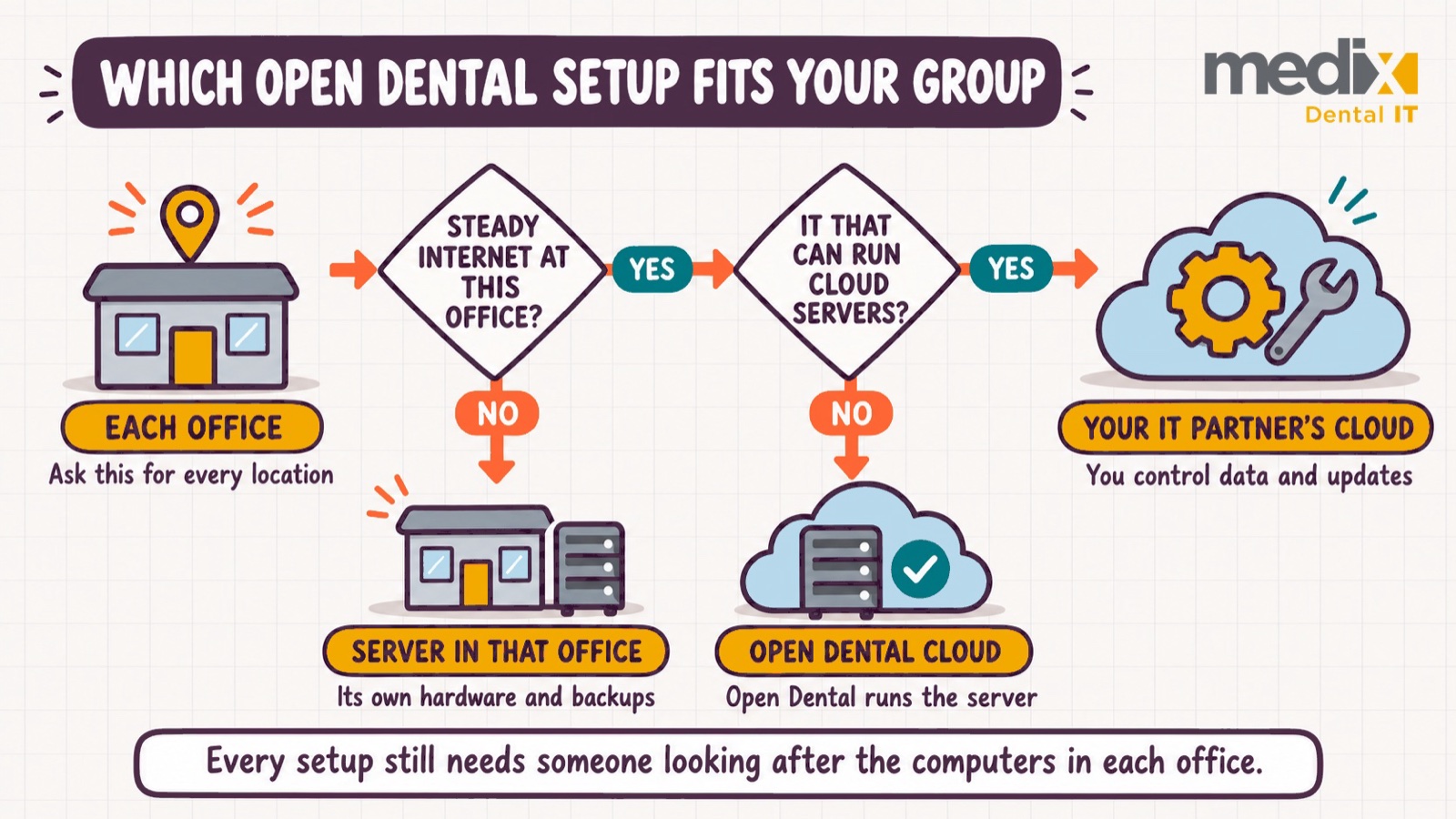
Then pressure-test that starting point with three more.
Do any integrations skip the Open Dental API? Open Dental flags those as a poor fit for Cloud. Ask every vendor that installs its own program to confirm Cloud support in writing.
Does anything depend on HL7, replication or a direct database connection? Ask Open Dental how Cloud handles each one before you commit.
Who restores the backups? On Cloud, Open Dental does. On the other two paths it is you or your IT partner, and the test that counts is backups that have been restored, not just taken.
If your group is weighing this, we are glad to walk through it with you. Bring your integration list, your imaging setup and your busiest-hour session count, and we will map what each setup would ask of your team as part of an IT roadmap review.
Posted in PMS