

September 29th, 2026
Open Dental Integrations: Which Vendors It Flags, and Why
Industry Research — PMS
Groups on Open Dental hear a familiar request from vendors. Give us database access and we will handle the rest.
Open Dental sorts the companies behind Open Dental integrations by how they reach your data, and it flags 23 of them as using a possibly dangerous method. Some of those may already be running in your practices. Below is what each group on that list means for a multi-location organization, and what it should change in your vendor contracts.
What Nobody Tells DSOs About Open Dental Integrations
Many DSO leaders hear “Open Dental” and think small practice software. We have built Open Dental cloud environments on Azure supporting hundreds of practices, and in that work I’ve seen many of the most integration-forward tools build for Open Dental first. That openness is a big part of why it ranks first in our dental PMS rankings for groups.
It is also why the platform needs rules about who can change what, and Open Dental’s guide to integration types sets them out. Reads are open: “Neither customers nor third parties need Open Dental’s approval to read data, for example to use for third-party dashboards or reporting tools.” For writes, the API is “generally the only safe way” for third parties to reach the Open Dental data tables.
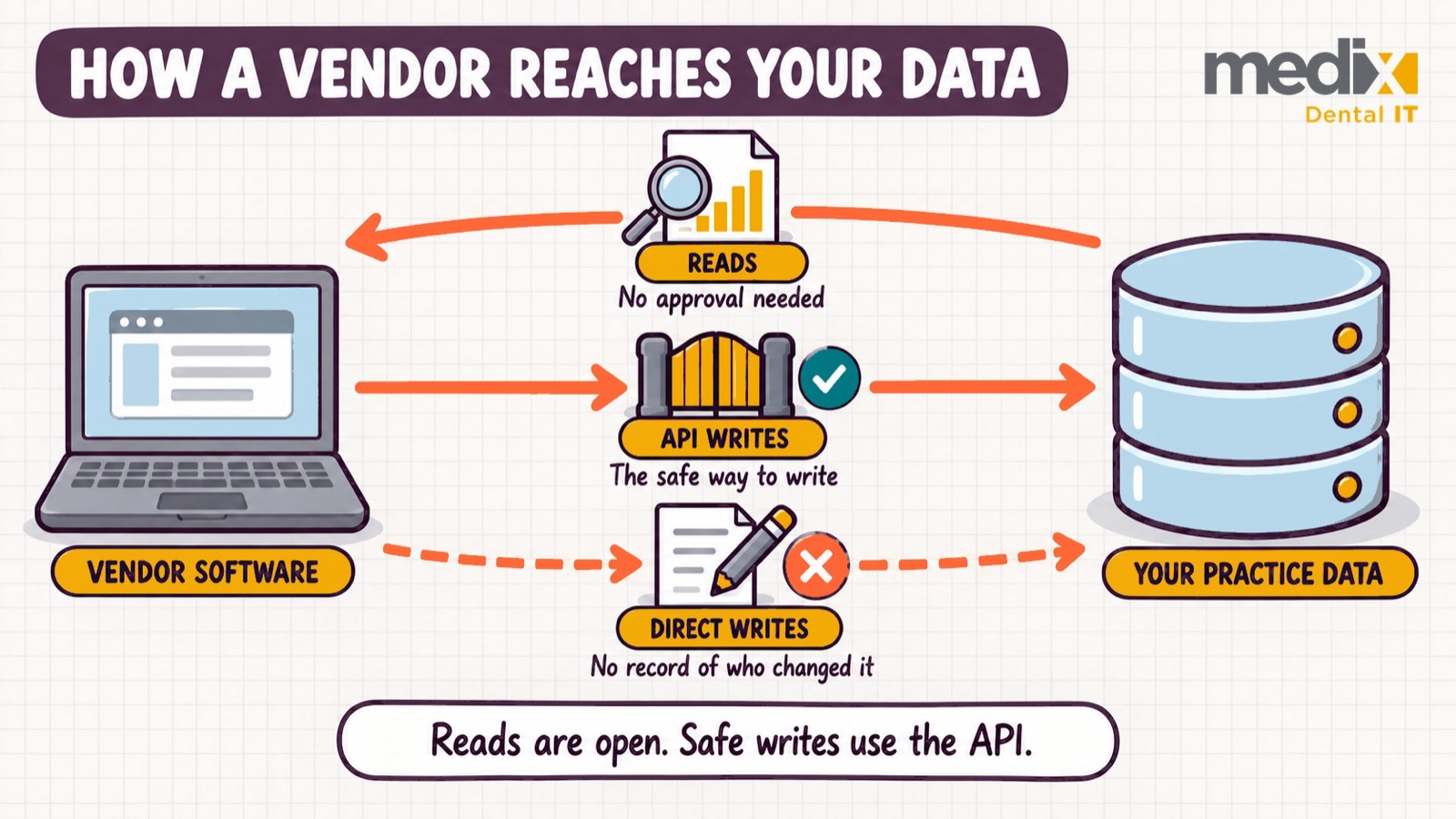
Writing directly to the database, in the guide’s words, “is unsafe, often insecure, and does not allow the office to know what program or user made the change.” For a group with centralized billing, that means a changed ledger entry may not trace back to the program that changed it.
Open Dental Integrations, Sorted by Open Dental’s Own Tiers
Open Dental’s third-party vendor list places named companies in three tiers by integration method, plus a fourth group of authorized vendors with no recent activity. The classifications are Open Dental’s own, and they change, so check the live page before raising one with a vendor.
The same page keeps a dated “Reported Concerns and Warnings” section. Open Dental explains that “When Open Dental receives negative reports about third-party companies, we sometimes must issue a warning,” and the section records resolutions too, such as its October 24, 2024 note that “Modento concerns have been addressed and resolved.” A vendor’s entry there can say more than its tier does, so read the two together.
| Open Dental group | Vendors listed | What sorts a vendor into it |
|---|---|---|
| Authorized | 87 | Integrates through the Open Dental API |
| Authorized In Transition | 11 | Moving to the API, or a new product in late-stage development |
| Dangerous/Unknown | 23 | A possibly dangerous method: a direct database write or a non-whitelisted plug-in |
| Not Currently Active | 16 | Uses the API, with no activity logged in the last 60 days |
1. Authorized: The Approved Method, Checked Module by Module
This is the largest group, 87 vendors “using an authorized integration, the Open Dental API,” among them Dental Intelligence, Overjet, Weave, Solutionreach, RevenueWell and Vyne Dental.
Where I’d hesitate is treating the tier as a blanket approval. Open Dental lists companies, and a company ships several products. Vyne Dental is Authorized, yet its own Open Dental Clinics page shows Vyne Trellis support for Clinics, the setup that runs multiple locations from one database, as “Coming soon!” The tier describes the method. Whether the module fits your configuration is a separate question.
2. Authorized In Transition: Watch the Two Asterisks
Open Dental defines this group as products “in active transition to using the API” or “new products (or new product capabilities) in late-stage development.” Eleven vendors sit here, including Intiveo, Practice by Numbers, Denti AI and MConsent.
PatientXpress and Sikka AI carry an asterisk, and the footnote reads: “These companies do not appear to be proactively transitioning their customers to the Open Dental API. You may need to reach out to these companies directly and request to transition your office to the Open Dental API.” In groups built by acquisition, what we commonly see is that these integrations arrived with the practice and were never revisited.
3. Dangerous/Unknown: The Column to Audit First
Open Dental describes these as vendors “using a possibly dangerous integration type.” It explains the danger as a third party writing directly to its database, and adds, alternatively, that “these vendors may be using a plug-in that has not been whitelisted.” The 23 names include NexHealth, CallRail, Lighthouse, Legwork, Sesame, Jarvis Analytics and Practice Mojo.
This column is about integration method. It is not a review of the products themselves. Open Dental says these vendors “should be avoided” and also publishes a route off the list for any vendor that is not writing to the database.
4. Not Currently Active: The Group Most Readers Skim Past
Sixteen vendors sit in a fourth group, placed under the Authorized column. Open Dental’s definition: “These vendors are using the Open Dental API but do not have activity logged in the last 60 days.”
For a group, this reads as inventory data. An authorized integration with no logged activity for 60 days may be a product nobody adopted, a workflow that quietly stopped, or seasonal use. The list names the vendor, not the locations it touches, so that check happens practice by practice.
What the Open Dental API Costs Per Location
Open Dental publishes its monthly API price ladder. Free covers Read All, throttled to one request per five seconds. $15 a month covers Comm, Documents, InsuranceSimple, Setup and Queries, at one request per second. $30 covers all permissions except Payments, PayPlans and Special, and $35 covers all except Special.
The same page states that “Pricing is per location,” and that “A key must be assigned and enabled before charges apply, and billing stops automatically if the key is disabled.”
For centralized reporting, the free read tier matters most. A group can read every location’s data at no license cost from Open Dental, and Open Dental’s developer API guide says requests made through the Local API or the API Service “are not throttled at all.” That is the data access argument behind our Dentrix vs Open Dental comparison.
Your vendor sets its own price on top of these fees. Ask for the Open Dental API fee as a separate line in the quote.
What to Do With Each Tier on Your Vendor List
Authorized means confirming the module you are buying. In Transition means a transition timeline in the contract. Dangerous/Unknown means asking the vendor which method your module uses today, in writing, before renewal. Not Currently Active means checking with the practice whether anyone still uses it.
Then add one clause to your vendor contracts: all writes go through the Open Dental API or another method Open Dental approves, and reads are documented by vendor, data and frequency. Groups buying practices should run this check during IT diligence on the practices they acquire, before an unsanctioned write path becomes part of someone’s daily workflow.
Open Dental Integrations FAQs
Does Open Dental have an API?
Yes, in three modes. The Local API runs inside the program on each workstation (port 30222), the API Service runs continuously on the database server (port 30223), and Remote is a cloud-hosted endpoint at api.opendental.com. Open Dental’s API setup page states the requirement for Remote: “In order to use the Remote API, the office must have an eConnector running.” Local and API Service requests stay on the practice network instead of traveling through Open Dental’s servers, so ask each vendor which mode it uses.
Will our integrations still work on Open Dental Cloud?
Open Dental keeps a list of Cloud integrations that are “expected to work within Open Dental Cloud,” and adds that “Not all integrations have been tested.” Many API vendors also work, but “Vendors who install a separate program, however, may not be compatible.” Before a Cloud migration, check each vendor against that list and ask any vendor that installs its own program whether it supports Cloud.
Can we query the Open Dental database directly for reporting?
Yes. Open Dental files direct SQL reads under types that “are not usually dangerous but can cause problems,” and says such queries “can slow down Open Dental if they are large, indexed poorly, or run too frequently.” It also warns that automated queries can “work fine for a long time and then suddenly cause problems.” A query one practice never notices can behave differently against a consolidated database serving thirty locations.
Is Open Dental going closed source?
It already changed. Open Dental’s license page says that in version 24.4 the license moved to proprietary from the open source GPL, with no change in price, support or database access. For integrations, the tier and method rules above apply either way, so the vendor list is still the page to check.
Posted in PMS


























































