

August 28th, 2026
Unify Dental Password Manager Review (2026)
Industry Research — Dental Cybersecurity
Credential access is one of the few operating problems that gets harder with every location you add, and dentistry has a version of it nobody else has.
This Unify Dental password manager review covers what the product does well, why it is our preferred solution, and the questions I would still put to their team in writing. I should disclose up front that we recommend Unify to clients more than anything else in this category. The dental industry is genuinely bad at credential management, and Unify is the only vendor that built for the specific version of that problem dentistry has.
What Unify Is and Who Builds It
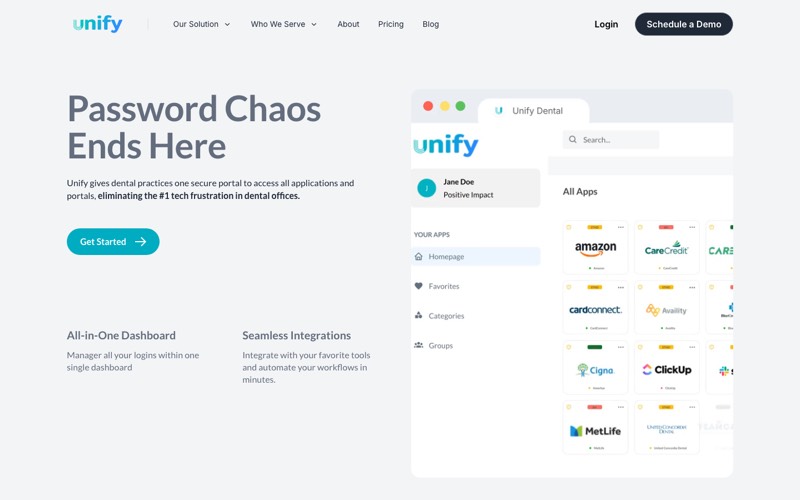
Unify is a credential and access management platform built only for dentistry, sold by Unify Dental LLC out of Denver. Founder Tanner Applegate started it in 2022 after running two DSOs, which shows in the product. The vendor reports serving over 1,000 offices nationwide.
It is cloud only, with no self-hosted option, and the company lists between two and ten employees on LinkedIn. That size cuts both ways, and I come back to it in the diligence section.
You may also see Unify alongside Vyne Dental. That relationship is a technology integration and joint marketing, nothing more. Vyne hosts a landing page for Unify and named Vyne Trellis as a connected system. Unify is not owned by, acquired by, or resold through Vyne, and the two are separate legal entities.
The Problem It Was Actually Built For
Most password managers were designed around a person protecting their own logins. Dentistry does not work that way, and the payors are a large part of why. Their portals are horrific, they support only single users, and they compound a credential problem the industry was already handling badly.
Centralize revenue cycle management across locations, which is what most groups do by their tenth office, and the mismatch becomes structural. One username, one password, one phone number that receives the verification code. Then a centralized billing team of nine people needs to work inside that portal all day.
What happens next is predictable. The credential gets shared, the verification code goes to one person’s cell phone, and work stops whenever that person is at lunch. Multiply that across Delta Dental, Cigna, MetLife, Aetna, and Guardian, then again by every location you have acquired.
This is a multi-location problem before it is a security problem. A single practice has one front desk improvising around it. A twelve-location group with centralized billing has nine people improvising around forty portals, and nobody who can say who currently has access to what.
Where Unify Genuinely Earns Its Price
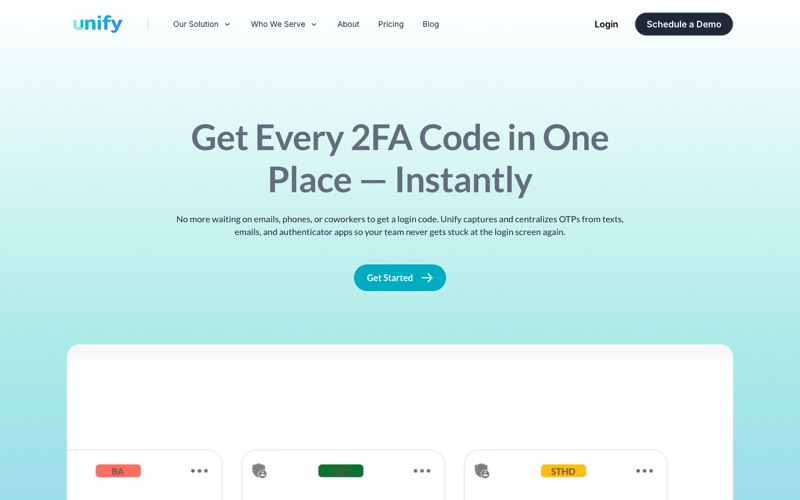
The centerpiece is one-time passcode centralization. Unify captures verification codes from text messages, email inboxes, and authenticator apps, then routes them to whoever is authorized to see them.
The mechanics matter. The vendor sets up a shared text number for the team, forwards email codes from multiple inboxes, and registers authenticator apps inside the platform so nobody passes a phone around. Codes appear for authorized users with a log of who used which one.
Bitwarden, Keeper, 1Password, and NordPass will all store the password. None of the four will get the verification code off someone’s personal phone.
The second thing it does well is speak dental. Unify advertises one-click access to more than 350 payer portals, and separately claims pre-built login flows for MetLife, Aetna, Guardian, Delta and 300 more, alongside Dentrix, Eaglesoft, Cigna, and HR for Health. Worth being precise about what that means. These are credential and autofill targets rather than data integrations, so Unify logs into those portals on your team’s behalf without exchanging records with them.
The Feature I Care Most About, and the Question I Would Still Ask
Unify markets the ability to “give them access without giving them the usernames and passwords.” That is the single most valuable idea on the site, and it is the reason I prefer this category of tool to a general one. My concern with general password managers has always been that a determined user can still find ways to extract the passwords if they choose. Concealed access solves that.
So this is a compliment wrapped in a request. That capability is the whole argument for Unify, and it is the one thing they have not explained anywhere. Across the marketing pages, product documentation, privacy policy and customer terms, there is no whitepaper, no security page, and no technical description of how the concealment works.
The published permission model is ordinary role-based access control, and administrators can reset stored passwords centrally, which suggests the vendor can decrypt what it stores. That is an inference rather than a confirmed fact, since central reset could mean several things architecturally. Ask them to walk you through it, particularly since centralizing verification codes also puts Unify inside your text and email delivery path.
The Compliance Questions to Put in Writing
This is the diligence I would run on any vendor holding this much, and it is where a DSO’s counsel will spend their time.
Unify states that it is “built with security and HIPAA compliance in mind,” that passwords are encrypted, and that audit logs track access. The audit trail is real value and more than most practices have today. Those are still the vendor’s words, describing design intent rather than a contractual commitment.
What I could not find anywhere is a Business Associate Agreement. The customer terms and conditions, governed by Delaware law, contain no mention of HIPAA, of a business associate, or of encryption. No dental-specific tool in this category publishes BAA terms, so Unify is not an outlier among its peers, but I would expect a company this deep in dental to have an answer ready.
The privacy policy is also narrower than most readers assume, covering practices “for visitors to our proprietary Internet site” rather than the credentials the product stores. The same question governs HIPAA-compliant email for dental practices, where what a vendor will sign matters more than what its marketing says.
One clarification, because it gets misread. Unify’s Enterprise tier lists “Enterprise Compliance Support (SOC 2, NIST, etc.)” as a customer benefit, which means support for your compliance program. That is not a statement that Unify holds a SOC 2 report, and I found no evidence on its website that it does.
Their LinkedIn page goes further, describing a “Zero-Trust Password Vault” with “end-to-end encryption that meets SOC 2, HIPAA, and NIST guidelines.” If that is accurate, it is a stronger security story than the website tells, and they are underselling themselves on the pages buyers actually read. Ask which controls that language refers to, and put the answer in your vendor file.
Running the Pricing Math at Your Actual Size
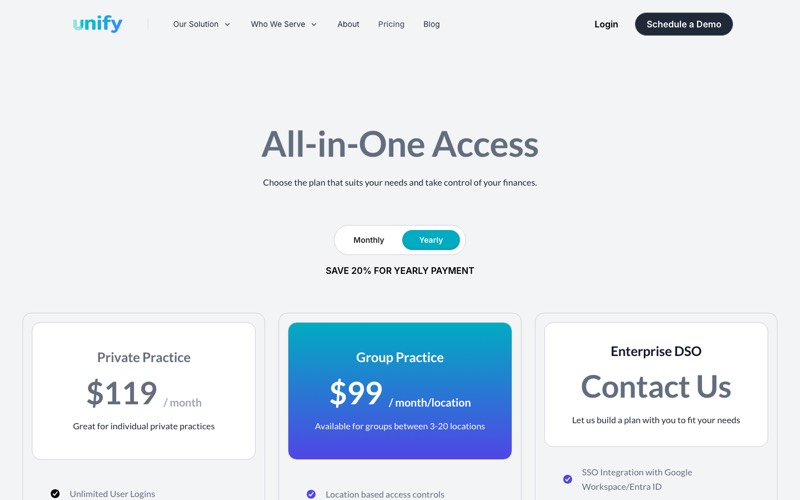
Unify bills per location, not per user, and every tier includes unlimited user logins. That single design choice determines whether this is cheap or expensive for you.
A single practice pays $149 per month, or $119 per month on annual billing. Groups of three to twenty locations pay $99 per month per location. Enterprise DSO pricing is not published, and neither is a rate for two-location groups, who fall between the published tiers.
Check the toggle before you budget. The pricing page loads on the yearly view, so the first number most people see is the discounted one with a “per month” label beside it.
Calculate the break-even rather than eyeballing it. Against a $4 per-seat tool, Unify costs less only above about 25 users per location. Against a $9 seat, the crossover is 11. Most groups sit below both, so a ten-location group with eight users per office pays $990 a month where a $4 per-user tool runs about $320.
That math favors the general tools on price alone, and it leaves out the thing you are actually buying. None of them route verification codes. Decide whether that feature is worth the spread at your headcount.
Published group pricing also stops at twenty locations, so anything larger is a sales conversation with no public benchmark, at exactly the size where you have the most leverage to ask for one.
How This Reads in Diligence
If you are acquiring practices or heading toward a recap, evaluate this differently than an office manager would.
Two things will draw attention. The first is vendor concentration risk. A company of two to ten people, with no published security attestation, holding the master credential set for every location is a finding a buy-side IT diligence team writes down. Not a deal breaker, but something you will be asked to explain, and shared-credential exposure of that kind recurs across the biggest dental data breaches on record.
The second is that per-location billing behaves differently across an acquisition pipeline than a per-seat contract does. Every close adds a full line item on day one, while a per-seat contract ramps with hiring.
The Enterprise tier is where this gets interesting for a platform, because it adds single sign-on with Google Workspace or Entra ID plus SCIM provisioning. SCIM addresses something we all know is true. Practices do not update their passwords when team members leave, and almost nobody does it reliably by hand at any size.
That is the strongest structural argument for putting credentials on a real platform. Accounts get created and disabled automatically from your directory rather than by someone remembering. If you already run Entra ID, that capability alone is the reason to have the Enterprise conversation.
Who Should Buy It, and Who Should Not
Buy it if payer portal access is the daily bottleneck for a centralized billing team, if your headcount per location is high enough to beat the per-seat math, and if you get satisfactory written answers on architecture and a BAA. The verification code routing is genuinely differentiated. Whichever way you go, inventory what you actually have first, the way you would work through a HIPAA compliance checklist, because most groups badly underestimate their credential count.
A general tool may fit better if your credential problem is ordinary business logins rather than insurance portals, since those cost less per seat at low headcount, and we compared the options worth shortlisting for a dental practice separately. Same answer if your carrier or auditor requires a signed BAA today, at least until Unify will put one in front of you. Neither case is a knock on the product. It is a question of whether you have the problem it was built to solve.
Your carrier may force the question before your buyer does. Cyber applications have moved past yes-or-no checkboxes, and what carriers actually ask on a cyber liability application now reaches into how access is controlled and revoked. If you are attesting to controls you cannot evidence, that is a renewal problem regardless of which vendor you pick.
My Verdict After Reading Everything They Publish
Unify is our preferred solution in this category, and this review should not leave any doubt about that. It solves a problem the rest of the market ignores, it was built by someone who ran DSOs and clearly understands the payer-portal mess, and the verification code routing does real work for a centralized billing team every single day. No general-purpose tool on the market answers it.
My open items are about documentation rather than the software. The concealed-access capability is the best idea they have and the one thing they never explain, and the customer contract does not mention HIPAA at all. Get three things in writing before a large rollout: how credential concealment works, whether they will sign a BAA, and what security attestation sits behind the LinkedIn language. Those are questions I would ask of any vendor holding this much, and I expect Unify to answer them well.
Unify Dental Password Manager FAQs
Is Unify Dental HIPAA compliant?
Unify states it is built with HIPAA compliance in mind, encrypts passwords, and keeps audit logs, and that audit trail is more than most practices have today. No HIPAA certification exists for any software, so the checkable question is whether a vendor will sign a Business Associate Agreement. Unify does not publish BAA terms on its site or in its customer terms, which is true of every dental-specific tool in this category. Ask directly and get the answer in writing.
How much does Unify Dental cost?
A single practice pays $149 per month, or $119 per month on annual billing. Groups of three to twenty locations pay $99 per month per location, with unlimited users included. Enterprise pricing is not published. The pricing page loads on the yearly view, so confirm the toggle before comparing against a per-user tool.
Will a small vendor be a problem in diligence?
It comes up. A two-to-ten-person company holding the credential set for every location, with no published security attestation, is something a buy-side IT team notes and asks about. It is rarely disqualifying on its own. Have the answers ready: what happens to your credentials if the vendor is acquired or shuts down, and whether you can export everything without their help.
Is Unify owned by Vyne Dental?
No. The two companies have a technology integration and a joint marketing arrangement, and Vyne hosts a landing page describing it. They are separate legal entities, and there is no acquisition, ownership stake, or reseller relationship between them.
Does Unify work with our existing identity provider?
At the Enterprise tier it does, adding single sign-on with Google Workspace or Entra ID plus SCIM provisioning. Below that tier it operates as a shared credential vault rather than an identity platform. SCIM creates and disables the Unify account from your directory automatically, which closes the offboarding gap on the vault itself. Rotating a genuinely shared payer credential after someone leaves remains a separate task.
Posted in Dental Cybersecurity


























































